The world just went silent.
For a fleeting moment, my phone, a sleek slab of glass and metal that usually hums with the constant chatter of the digital universe, blinked out. No signal bars. No emergency call capability. Just… nothing. It was a jarring interruption, a reminder that the invisible scaffolding of cellular communication, the very thing we take for granted as a constant, is surprisingly fragile and, more alarmingly, surprisingly susceptible to impersonation. This isn’t some theoretical, far-off concern; this is happening now, daily, to all of us. Your phone is likely connecting to fake cell towers, and you wouldn’t even know it.
This is the fundamental flaw: cellular networks were built for accessibility, not absolute verification. Your device, like a eager suitor, broadcasts its presence to every tower in earshot, and the one with the loudest signal – the one that shouts the most convincingly – wins. It’s a system that assumes trust from the outset, and that assumption, that innocent faith, is precisely where the rot sets in. The network only authenticates you after you’ve already committed, and in the older 2G networks, a full authentication of the network itself? Forget about it. Even with 4G and 5G, it’s only a partial handshake. Your phone wants to stay connected, and it will happily settle for a convincing lie.
Think about it. In 2019, I was standing outside a security conference in Las Vegas, of all places, when my test Android phone suddenly dropped from a strong LTE connection down to a sluggish 2G for nearly a minute. A silent downgrade, no fanfare, no user alert. The baseband logs, if you dig deep enough, told a chilling story: a forced cipher downgrade to an ancient, unencrypted standard (A5/0), a location area code that existed nowhere in reality, and a silent authentication request. I was running SnoopSnitch, a tool designed to sniff out these digital phantoms, and there it was – clear evidence of an IMSI catcher, a fake cell tower, in the wild. Back then, these things were expensive, the domain of nation-states and deep-pocketed intelligence agencies. Now? The landscape has fundamentally shifted. The price of entry has plummeted.
The $600 Phantom Network
It’s almost laughable, or perhaps terrifying, how accessible this technology has become. By 2026, and honestly, it’s probably closer than that, you can cobble together a functional LTE catcher for less than $600. Open-source software, a humble Software Defined Radio (SDR), and a bit of know-how – that’s it. I know this because I’ve built them myself for red team exercises, and then, crucially, I build the tools to find them. This isn’t hypothetical; it’s a craft. The components are readily available, off-the-shelf hardware. A BladeRF x40, a Raspberry Pi 5, and some clever code like srsRAN can spin up a complete LTE network in a package smaller than a textbook. It’s a digital Trojan horse, small enough to be overlooked, powerful enough to compromise.
This shift has democratized surveillance. Private investigators use these devices for discreet location tracking. Corporate security teams deploy them at high-profile events to monitor their employees’ devices – imagine the data leaks waiting to happen. Even criminal elements are getting in on the act, using passive GSM sniffers, costing as little as $35, to hoover up device identifiers for SIM swap operations. Passive sniffing is particularly insidious because it doesn’t transmit, meaning it sails under the radar of many regulatory frameworks. An RTL-SDR dongle can log every IMSI within a 500-meter radius without ever alerting the target device. It’s like a silent whisper in a crowded room, collecting secrets without making a sound.
Why Your Phone is a Willing Participant
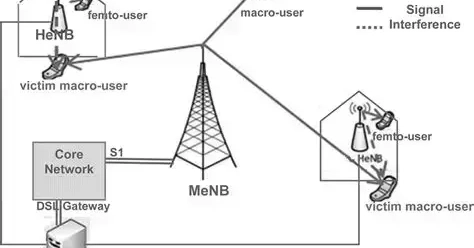
So, how does this magic – or rather, this malevolent trickery – work? For the older 2G networks, it’s brutally simple. Carriers, to maintain backward compatibility for older devices and ensure coverage in remote areas, keep 2G alive and kicking. A fake tower exploits this by broadcasting an incredibly strong 2G signal. Your modern, supposedly advanced smartphone, desperate to maintain a connection, will dutifully downgrade. During this downgrade, encryption often gets thrown out the window, and your precious IMSI (International Mobile Subscriber Identity) and IMEI (International Mobile Equipment Identity) are broadcast in plain text, like a postcard sent through the mail.
In the more sophisticated 4G and 5G networks, the attack is subtler. Instead of forcing a 2G downgrade, these modern simulators broadcast a malformed 5G NSA (Non-Standalone) cell. This triggers a fallback to LTE, but with a crucial twist: null integrity protection. Your phone thinks it’s performing a normal handover, a routine part of network management. The user sees full bars, blissfully unaware that their connection is being subtly hijacked. I’ve personally captured these events in major US cities, at airports, and even near government facilities. These devices are shrinking, often battery-powered, and designed for short, ephemeral bursts of activity to evade detection.
Your phone offers zero native warning for any of this. iOS, bless its walled garden, provides absolutely no baseband visibility to users. Android offers a sliver of access, but typically requires root privileges and specific hardware. It’s like asking a castle to reveal its secret passages – they’re just not meant for public consumption.
Becoming Your Own Network Detective
The good news? You don’t have to be a master spy to start spotting these anomalies. Detection, however, isn’t about a single app; it requires correlation across multiple data streams. The first step is gaining direct baseband access, which, on many Qualcomm devices, is possible through diagnostic mode. SnoopSnitch, available on F-Droid, remains a top-tier tool. Grant it root access and enable active tests. It diligently monitors for cipher downgrades to unencrypted modes (A5/0, A5/1, A5/2), location area code changes that don’t align with your actual movement, missing neighbor cell lists (a sign of a disconnected or artificial network), authentication requests lacking encryption, and those ominous silent SMS type 0 messages.
Run it continuously for at least seven days. Why seven? To establish a baseline. Real cellular networks, with all their quirks and imperfections, have a consistent set of quirks. A fake tower, on the other hand, introduces anomalies that are jarringly out of place and don’t repeat. It’s the digital equivalent of a magician’s sleight of hand – the trick only works if you don’t look closely at the patterns.
For manual verification, you can dive into your phone’s service mode. Samsung users can dial #0011#, while Pixel owners can use ##4636##*. Once in, select ‘phone information’ and document your serving cell, physical cell ID, TAC (Tracking Area Code), and band. If you observe a sudden, inexplicable shift from, say, LTE band 2 to a much older GSM 850 signal in a bustling urban area with strong LTE coverage, that’s a red flag warranting immediate investigation.
Ultimately, you can’t spot an anomaly without knowing what’s normal. I’ve taken to maintaining a personal database of legitimate towers in areas I frequent. Tools like CellMapper are invaluable for logging cells during your regular travels. Export that data weekly. I then run a simple Python script to compare my current serving cells against my historical database. Any cell ID that pops up for less than three minutes and isn’t in established databases like OpenCellID or my own logs gets flagged for closer scrutiny. Key indicators to watch for in the data include TAC values of 1, 0, or 65535 – these are often reserved for testing environments. Also, look for MCC/MNC (Mobile Country Code/Mobile Network Code) combinations that don’t align with your local carriers, cells with no neighbor relations (a sign of isolation), and signal strengths above -55 dBm in areas where legitimate macro cells typically hover between -80 to -95 dBm. A legitimate small cell, even a private one, will appear consistently. A portable simulator? It’ll likely appear once, then vanish like a ghost.
Your phone connects to the strongest tower it hears. It does not ask for ID first. It assumes trust, and that assumption is the entire problem.
The platform shift to AI has been heralded with much fanfare, but what we’re seeing here is a different kind of fundamental shift – the weaponization of ubiquitous connectivity. Our phones, the very devices that have woven us into the fabric of the digital world, are also the most potent entry points for its subversion. This isn’t just about privacy anymore; it’s about the integrity of our most fundamental digital interactions. We’re no longer just users; we’re nodes in a network, and like any node, we can be compromised. The race is on to build the defenses to match the evolving offense.