Finally, secrets.
Look, we’ve all been there. You’re building out these complex performance tests, simulating actual user behavior, and suddenly you’re staring down a script choked with API keys, tokens, and god knows what other digital skeleton keys. It’s a mess. A security nightmare waiting to happen. And the bigger your testing suite gets, the more it sprawls across configs and environments, turning your neatly organized code into a vulnerable minefield. Grafana Cloud’s k6, their fully managed performance testing platform, is finally throwing a bone to us weary testers with the introduction of secrets management.
So, what does this actually mean? It means you can stop treating your sensitive credentials like glitter at a rave – getting them everywhere. The idea is simple, and frankly, long overdue: securely store and use these sensitive values right within Grafana Cloud. No more baking API tokens directly into your JavaScript. No more passing them around like hot potatoes. Instead, these secrets live centrally and are injected into your tests only when they’re actually running. This keeps your scripts cleaner, dodges those embarrassing leaks in version control (you know, the ones your auto-scanner flags with a neon sign), and makes reusing tests across different staging or production environments a less soul-crushing endeavor.
How to Get Your Hands Dirty
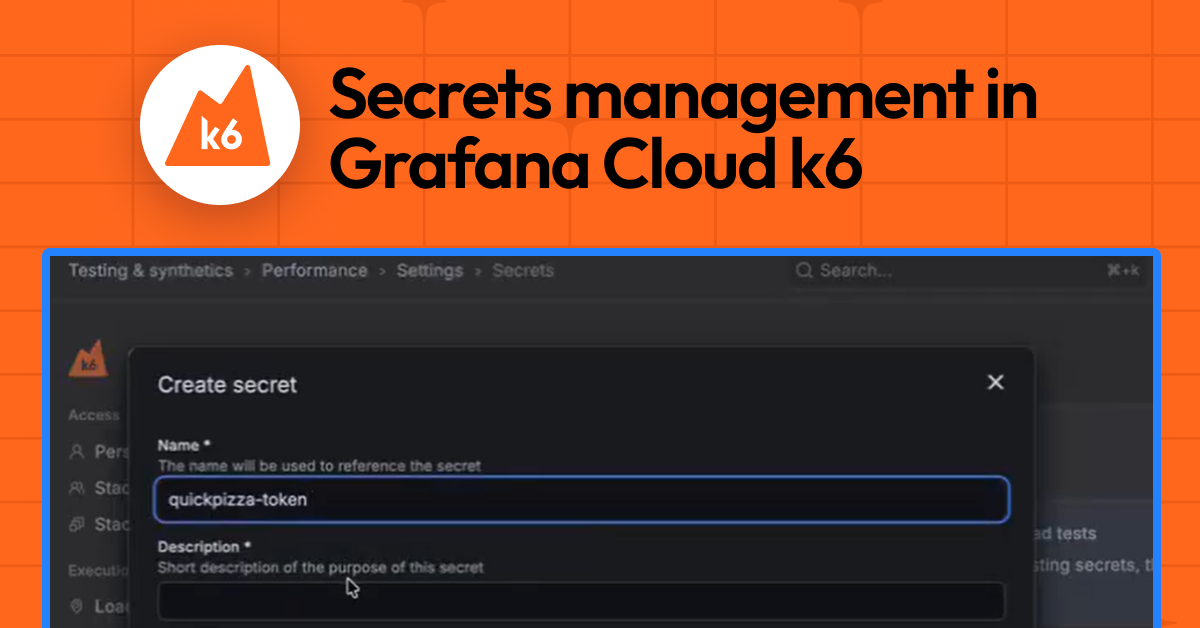
Getting started isn’t exactly rocket science. You navigate over to the Grafana Cloud web UI – specifically Testing & synthetics > Performance > Settings, and then you’ll find a ‘Secrets’ tab. From there, it’s a pretty standard CRUD operation: create, edit, delete. When you create a secret, you give it a name (how your script will reference it), a description (why you even need this digital unicorn), and the actual sensitive value. Crucially, once you save it, that value is write-only in the UI. You can’t accidentally click and reveal it later. For credential rotation, you just overwrite the old value with the new. This ‘write-only’ ethos is, blessedly, aligned with how any sane security practice should operate.
A key design principle here is that secret values are write-only in the UI. After creation, they cannot be read back or displayed.
Using Them in the Wild
Once your secrets are stashed away, integrating them into your k6 scripts is surprisingly straightforward. Grafana Cloud’s k6 has a dedicated module, k6/secrets. You import it, and then you can grab a secret by its name at runtime. Take this snippet, for instance:
import check from "k6";
import http from 'k6/http';
import secrets from 'k6/secrets';

export default async function main () {
  const apiToken = await secrets.get('api-token');
  const headers = {
    Authorization: `Bearer ${apiToken}`,
  };

  console.log("Headers: " + JSON.stringify(headers))
  let res = http.get('https://example.com/api', {headers: headers});
  check(res, { "get executions status is 200": (res) => res.status === 200 });
}
See? The api-token is fetched when the test fires up, jammed into the Authorization header, and behaves just like any other variable. This means you can ease your way into this, swapping out hardcoded values or clunky environment variable setups gradually. No need for a complete rewrite.
And for those of us who’ve accidentally logged secrets to the console only to watch our careers flash before our eyes? Grafana k6 has your back. If a secret somehow gets printed in the logs – a redacted placeholder shows up instead of the actual sensitive data. This, combined with the write-only UI, means secrets are actually protected from creation through their usage and even in the observability outputs. It’s a start.
This secrets management feature is currently in public preview for Grafana Cloud k6. It’s also generally available in Grafana Cloud Synthetic Monitoring. They’re pushing their generous forever-free tier and plans for every use case, so signing up is, predictably, free.
Who Actually Benefits Here?
On the surface, this is a win for developers and QA engineers who are tired of the security theatre and organizational headaches that come with managing credentials for performance testing. It’s a direct response to a persistent pain point. But let’s be real, the real beneficiaries are the folks at Grafana Labs. By adding this layer of functionality to their managed service, they’re making k6 more attractive to enterprises that are increasingly paranoid about data security – and rightly so. This isn’t just about better testing; it’s about selling more licenses and locking customers into their cloud ecosystem. It’s a classic case of addressing a user need while simultaneously strengthening their own commercial position. Who’s making money? The company offering the managed service, of course, by making their offering more strong and secure, thus justifying the subscription fees. The real question is how much extra are they charging for this, or is it just baked into the existing tiers? For now, it’s a welcome addition to an already capable tool, but the long-term pricing strategy will tell the real story.
What’s the Historical Parallel Here?
This feels like a direct echo of what we saw in the CI/CD space a decade ago. Remember when pipelines were a tangled mess of shell scripts and hardcoded secrets? Then came tools like HashiCorp Vault, or integrated secrets management in platforms like GitLab and GitHub Actions. They solved a similar problem: centralizing and securing sensitive data for automated workflows. Grafana k6 is doing for performance testing what those platforms did for general automation. It’s a natural progression. As tools become more sophisticated and integrated into cloud-native workflows, the need for strong, built-in security features like secrets management becomes not just a nice-to-have, but a requirement. It’s the maturation of a specific tooling category, driven by the same forces of scale and security that have shaped so many other areas of software development.
**
🧬 Related Insights
- Read more: HarfBuzz’s WebGL Slug Demo: Slick, But Does Text Shaping Need GPU Muscle?
- Read more: AWS Elemental Inference: Live Video Goes Vertical in Seconds
Frequently Asked Questions**
What does Grafana Cloud k6 secrets management do? It allows you to securely store sensitive data like API keys and tokens within Grafana Cloud, so they can be injected into your performance tests at runtime without being hardcoded or exposed in logs.
Is this feature available for free users? Secrets management is available in public preview for Grafana Cloud k6. Specific tier availability and free tier access details should be confirmed with Grafana Labs’ latest pricing information.
Will this replace my need for a dedicated secrets manager like Vault? For performance testing specifically within Grafana Cloud k6, this provides integrated secrets management. For broader organizational needs or more complex secret rotation policies, a dedicated secrets manager like HashiCorp Vault might still be necessary.