Look, they finally did it. React Native’s New Architecture, the one with all the fancy acronyms like JSI, Fabric, and TurboModules, is now the default. For a while there, it felt like we’d be talking about it as vaporware forever, but here we are. It’s supposed to be this fundamental shift in how React Native talks to the native side of things, especially where performance is key. This isn’t your typical ‘getting started’ fluff; we’re digging into what it actually means for apps running in the wild – the real performance wins, the problems it doesn’t solve, and what you’re getting into if you dare to migrate an existing project.
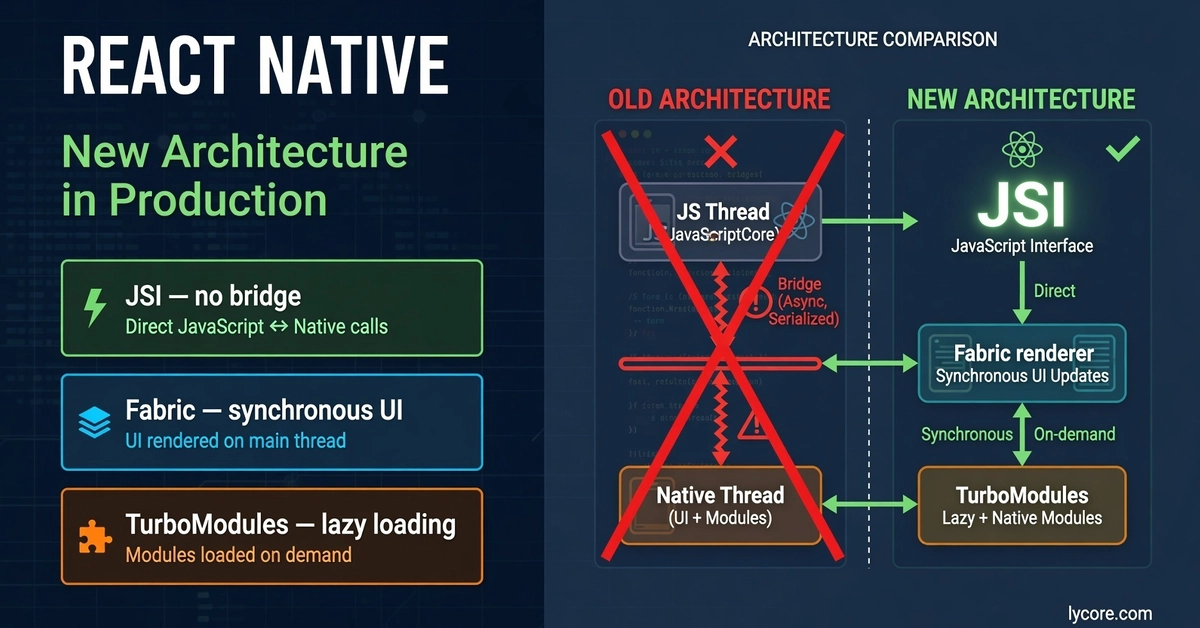
To get a grip on what’s new, you gotta understand what it’s replacing. The old way of doing things relied on a bridge – think of it as a chatty, asynchronous messenger. JavaScript would package up its requests, send them across this bridge as JSON, the native side would unpack it, do its thing, then send a JSON response back. Rinse and repeat. Sounds clunky? It was.
Three big headaches emerged from this bridge system:
Sync Needs Met With Async Delays: Sometimes, you need an instant answer. Like, trying to grab a UI element’s position for an animation. The bridge made this awkward. You either endured slow, back-and-forth communication or relied on potentially stale cached data. Not exactly ideal for silky-smooth animations.
The Serialization Tax: Every single interaction between JavaScript and native meant JSON serialization and deserialization. For things happening constantly – scrolling, gestures, animation frames – this overhead was a noticeable drag on performance. It’s like paying a toll on every single word you speak.
Eagerly Initializing Everything: The old architecture insisted on loading all native modules at startup, whether your app actually used them or not. For apps bloated with third-party native components, this hammered startup times before the user even saw anything. It’s like hiring a full orchestra for a solo act.
Now, enter JSI – the JavaScript Interface. This thing swaps out the bridge entirely, replacing it with direct C++ bindings. What does that mean in plain English? JavaScript can now hold direct references to native objects and fire off native method calls. No more queuing, no more JSON translation, just pure, synchronous communication. It’s the difference between sending a letter and making a phone call.
From the JavaScript developer’s seat, calling a JSI-powered function feels as natural as calling any other JavaScript function. Because, effectively, it is. The native code runs synchronously, right there on the JavaScript thread, thanks to this JSI host object magic. It’s a lot cleaner, a lot faster.
Here’s a peek at the C++ side, just to show the underlying mechanism. This isn’t the full TurboModules deal, but it illustrates the directness JSI provides:
// JSI binding example — what JSI enables at the C++ layer
// This is simplified from how TurboModules work internally
class NativeStorageModule : public jsi::HostObject {
public:
jsi::Value get(jsi::Runtime& runtime, const jsi::PropNameID& name) override {
// JavaScript calls this directly via JSI
// No bridge, no serialisation
if (name.utf8(runtime) == "getItem") {
return jsi::Function::createFromHostFunction(
runtime,
name,
1, // number of arguments
[this](jsi::Runtime& rt, const jsi::Value&, const jsi::Value* args, size_t) {
auto key = args[0].getString(rt).utf8(rt);
return jsi::Value(rt, jsi::String::createFromUtf8(rt, storage_[key]));
}
);
}
return jsi::Value::undefined();
}
private:
std::unordered_map<std::string, std::string> storage_;
};
TurboModules are the next big leap, using JSI to offer this direct, type-safe pathway from JavaScript to native code. They ditch the old NativeModules system for two key improvements: lazy loading and strong type checking.
On-Demand Initialization: TurboModules only wake up when they’re actually needed, not at the start of the app. If your app has 30 native modules but only uses five, you’re only paying the startup cost for those five. This is a direct hit against bloated startup times. It’s about efficiency, finally.
Type Safety by Design: TurboModules are defined in specs written in TypeScript or Flow. A tool called Codegen then automatically whips up the native interface code. This slashes those infuriating type mismatch bugs that used to plague the old system – the ones that only surfaced as runtime crashes after you’d confidently sent the wrong data type across.
Take a look at what a TurboModule spec file looks like. It’s the blueprint:
// NativeDocumentProcessor.ts — the spec file
import type { TurboModule } from 'react-native';
import { TurboModuleRegistry } from 'react-native';
export interface Spec extends TurboModule {
processDocument(documentId: string, options: ProcessingOptions): Promise<ProcessingResult>;
cancelProcessing(jobId: string): void;
readonly getVersion: () => string;
}
interface ProcessingOptions {
extractTables: boolean;
extractImages: boolean;
language: string;
}
interface ProcessingResult {
jobId: string;
status: 'success' | 'error' | 'partial';
extractedData: Record<string, unknown>;
processingTimeMs: number;
}
export default TurboModuleRegistry.getEnforcing<Spec>('DocumentProcessor');
Codegen then takes this spec and generates the necessary Objective-C/Swift for iOS and Java/Kotlin for Android. It’s a disciplined approach to interop.
Fabric, on the other hand, is React Native’s new rendering system. It’s designed to work hand-in-hand with JSI and TurboModules. Where the old renderer was largely synchronous and single-threaded, Fabric is asynchronous, concurrent, and interruptible. Think of it as React Native’s UI thread finally getting a brain capable of multitasking. It can now handle UI updates more intelligently, prioritizing critical tasks and responding to user input more fluidly, even during complex rendering operations. This is where you’ll see some of the most tangible improvements in UI responsiveness, especially in highly interactive applications. It’s a fundamental re-architecting of how the UI itself gets drawn and managed, making it far more strong.
So, what does all this mean for you in the trenches?
Performance Gains: Real, But Conditional. You’ll see better performance, especially in scenarios involving heavy native module interaction or complex UI updates. Animations will feel smoother, and startup times can improve significantly for apps that relied heavily on many native modules. But don’t expect miracles if your app’s bottleneck isn’t in the JS-native boundary or rendering pipeline. The gains are real, but they’re not universal.
Migration Complexity: It’s Not a Click-and-Go. Switching an existing app over isn’t trivial. While Meta provides tools and guides, you’ll likely need to refactor parts of your native code and potentially update dependencies that haven’t caught up to the New Architecture. It’s a project, not a flip of a switch.
New Bugs, New Learning Curves: As with any major architectural shift, expect some teething problems. Dependencies might break, and you’ll need to get your head around JSI, TurboModules, and Fabric. The learning curve is steep, but the upside is a more modern, performant, and maintainable codebase.
The official line is that this is a massive step forward. And, honestly, it is. Replacing a decades-old bridge with direct JSI calls, lazy-loading modules, and type-safe interfaces is undeniably good engineering. It addresses fundamental architectural limitations. My skepticism, however, always circles back to the users and the developers actually building things. For teams with the resources and the need for that next-level performance, this is a godsend. For smaller teams, or those with perfectly ‘good enough’ apps, the migration effort might feel like overkill. It’s a classic Silicon Valley move: build something technically brilliant, then figure out if anyone really needs it at scale, or if it’s just a shiny new toy for the privileged few.
But let’s not forget the PR machine behind this. The framing is always about empowering developers. And yes, theoretically, it does. But the reality is that adopting this new architecture requires significant investment – in time, in developer training, and in potentially costly refactoring. Who truly benefits most? The platform vendors who want to push the bleeding edge, and the large app developers who can afford the upgrade path. It’s a step towards a more unified and performant React Native, but it comes with a price tag measured in developer hours and complexity.
“This post is not a getting-started guide. It is an honest account of what the New Architecture actually changes in production applications — which performance improvements are real, which problems it does not fix, what the migration involves, and what you need to know before enabling it on an existing app.”
Ultimately, the New Architecture represents a mature evolution of React Native. It’s a necessary upgrade for the framework to remain competitive and capable of handling the demands of modern, complex applications. The direct JSI bindings and the move away from serialization are significant technical achievements. TurboModules offer much-needed lazy loading and type safety, while Fabric promises a more responsive and concurrent UI. The question for many teams won’t be if they should adopt it, but when and how to manage the transition effectively. It’s a bet on the future of cross-platform development, and for those willing to make it, the potential rewards are substantial.
Is It Worth Migrating Now?
That depends entirely on your app’s needs and your team’s capacity. If you’re experiencing performance bottlenecks related to the JS-native bridge or native module initialization, the New Architecture is a strong contender for a solution. For new projects, it’s a no-brainer to start with it. For existing apps, carefully assess the migration effort against the expected benefits. It’s not a simple upgrade; it requires planning and potentially significant development time.
What About Third-Party Libraries?
The ecosystem is playing catch-up. Many popular libraries have already updated to support the New Architecture. However, it’s crucial to check the compatibility status of all your critical dependencies before embarking on a migration. You might find yourself waiting for library maintainers or needing to fork and update them yourself – a common challenge with major framework overhauls.
Will This Replace My Job?
No, this won’t replace your job. Instead, it shifts the required skill set. Developers will need to understand the interplay between JavaScript, JSI, and native code more deeply. The ability to debug performance issues at this new architectural layer will become more valuable. Think of it as an evolution of your role, requiring new knowledge, rather than obsolescence.