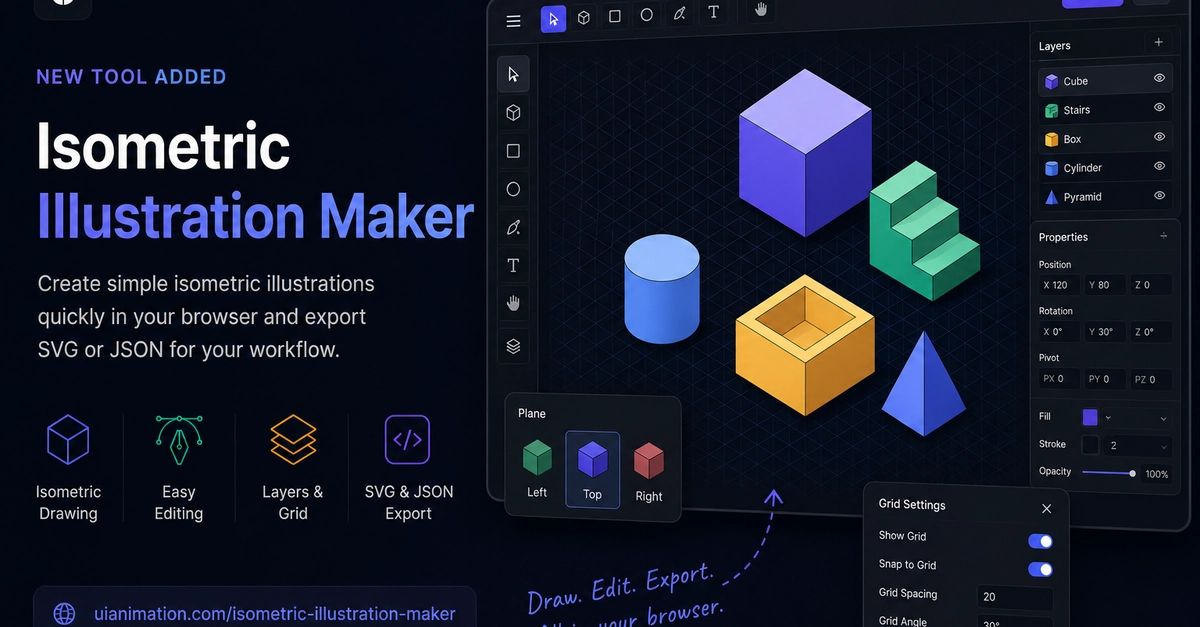
Here’s a number that’ll make you squint: 800%. That’s roughly how much time I’ve seen wasted opening a beastly design application just to churn out a simple isometric cube for a landing page animation. It’s absurd. And it’s precisely the kind of workflow inefficiency that UIAnimation.com’s new Isometric Illustration Maker aims to obliterate.
Look, we’re living in an age where developers practically live in their IDEs, motion designers are wrangling Lottie and Rive, and startups are desperately trying to avoid the drag of over-engineered desktop software. Yet, for those small, vital SVG assets that glue UI animations together, the workflow often remains stubbornly archaic. Open Figma. Draw. Export. Clean. Re-import. Optimize. Again.
It’s a dance of inefficiency, and this new tool, deceptively simple in its ambition, wants to cut it short. The goal? A fast, lightweight, browser-native experience for drawing and exporting those specific, crucial isometric illustrations.
Why All the Fuss Over Cubes?
It’s not just about pretty pictures. Modern product teams are pushing for speed. Developers are integrating SVGs directly. Motion designers are animating vectors. Startups need custom assets without the price tag of a full design suite. But the disconnect between a designer’s canvas and a developer’s pipeline has always been… a problem. This tool is a direct assault on that friction.
The goal is simple: Create a fast, lightweight workflow for drawing and exporting small isometric illustrations directly in the browser.
This isn’t trying to be Photoshop. It’s not trying to replace your Illustrator or Figma. It’s hyper-focused. Draw. Edit. Export SVG or JSON. Integrate. That’s the core loop. It’s designed for UI animation systems, web apps, landing pages, and those Lottie/Rive pipelines that demand clean, production-ready vectors.
The Interaction Dance: Can a Browser App Feel Good?
This is where many lightweight creative tools stumble. They feel laggy. The tools fight you. The interface gets cluttered. UIAnimation.com claims to have tackled this head-on, focusing on smoother mouse rendering, a calmer visual hierarchy, and those floating contextual controls that make desktop apps feel responsive. It’s about making a browser tool feel like a dedicated creative application, without the bloat.
For startups and smaller teams, this could be a revelation. Need a few custom isometric server illustrations for a dashboard? Tired of hunting through expensive stock asset packs? Whip them up in minutes. Motion designers needing modular assets for Lottie or Rive can now get them directly, with a cleaner export that’s crucial for animation pipelines. Developers, rejoice: cleaner SVGs mean less cleanup and easier integration.
Consider the SVG nightmare. Unnecessary groups. Hidden layers. Broken transforms. Editor metadata bleeding into your production code. This tool promises to sanitize that mess, churning out SVG structures that actually play nice with web rendering, animation tools, and frontend frameworks. For design systems at scale, that’s not just convenient, it’s essential.
But let’s pump the brakes for a second. Building smooth vector editing in the browser isn’t trivial. It’s a constant battle of optimization. RequestAnimationFrame, smart redrawing, careful interaction design – these are the unsung heroes that make or break browser-based creative apps. We’ll have to see if their implementation holds up under real-world, high-pressure usage. My skepticism, as always, is firmly intact. This is a crowded space, and ‘almost there’ doesn’t cut it.
Will This Replace My Job?
Probably not. This tool is designed for specific tasks – creating small, isometric SVG assets for UI animations. It’s a workflow enhancer, not a replacement for full-fledged illustration software or the creativity of a seasoned designer. It aims to free up your time from tedious, repetitive tasks so you can focus on the more impactful creative work.
What Kind of Animations is This Good For?
It’s ideal for UI animations that require geometric shapes, platform elements, or simple scene blocks. Think dashboard visualizations, landing page graphics, or modular components for Lottie/Rive animations. It’s less suited for character illustration or complex scenes.
Is This Tool Open Source?
Based on the provided information, the tool itself is not described as open source. It’s a browser-based application offered by UIAnimation.com. However, the output — the SVGs and JSON — are intended for integration into various development workflows, which often involves open-source frameworks and libraries.