Here’s a number that should make any engineer with operational software experience pause: 30 seconds. That’s the difference between a CRM setup flow working perfectly in development and grinding to a crawl in production. Thirty agonizing seconds, likely with a customer staring at a frozen screen, all because of a synchronous external API call. It’s the kind of friction that doesn’t just annoy users; it erodes trust and can torpedo an otherwise well-intentioned product.
This isn’t a hypothetical. It’s the reality of building software that does things in the real world – software that interfaces with other systems, handles user uploads, or orchestrates complex multi-step processes. The instinct to build it all synchronously, step-by-step, request-response, is powerful. It’s also, as the author points out, a ticking time bomb.
Why the Synchronous Seduction Fails
The problem boils down to control and predictability. When you run operations synchronously, you’re chaining events in a single thread. Your application’s responsiveness is directly tied to the slowest link in that chain. And in operational software, those slow links are everywhere:
-
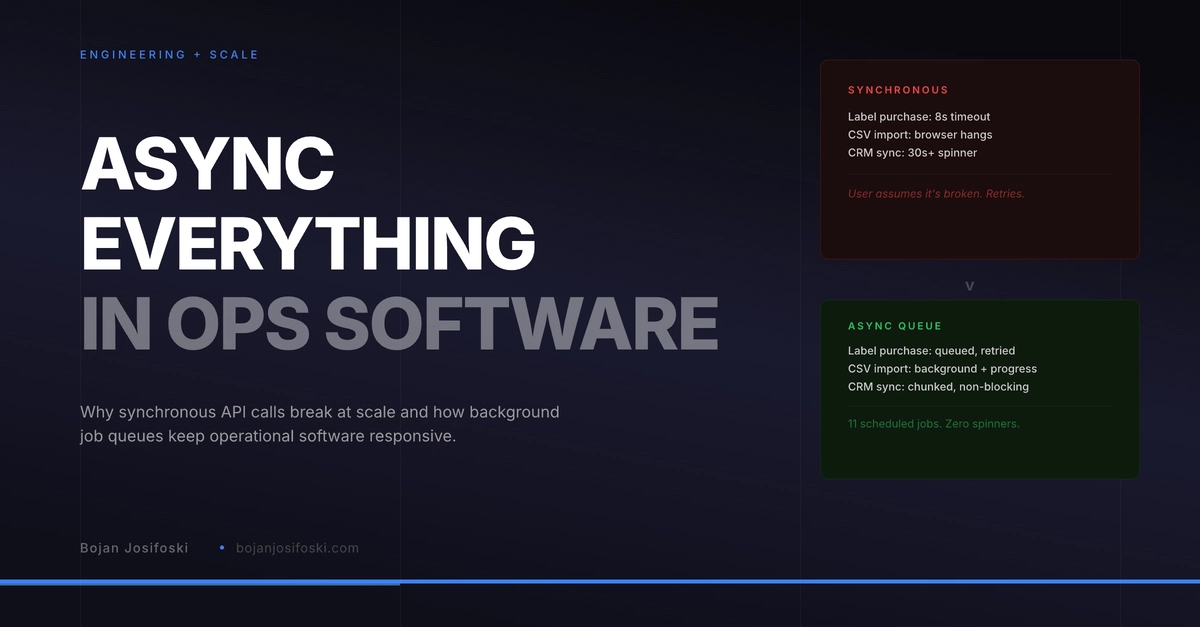
External API calls. These are the absolute worst offenders. We’re talking about services like Salesforce, Shippo, or any other third-party API. They operate on their own schedules, on their own infrastructure, and are subject to their own loads. A 1-to-5-second API call is common. But when that API hiccups, your user waits 10, 20, even 30 seconds. And in their mind, your entire system is broken.
-
Bulk operations. Imagine importing a CSV file with 500 rows. If each row triggers a database insert, an image download, and a validation check – all synchronously – you’re locking up the browser tab for minutes. The user has no idea if it’s progressing or stuck. Close the tab? Half your data is now in limbo.
-
Multi-step workflows. Setting up a CRM integration isn’t a single API call. It’s OAuth, probing, metadata deployment, webhook setup. Each step can take seconds. String them together synchronously, and a 45-second setup flow with zero visual feedback becomes the user’s worst nightmare.
-
Nightly maintenance. Think about tasks that need to run across all your users’ data – attribution backfills, webhook cleanup, cache refreshes. Trying to do this synchronously within a single user request? Impossible. These are prime candidates for background processing.
The Rise of the Background Worker
So, what’s the antidote? Asynchronous processing. Queuing tasks to be handled by background workers. It’s a fundamental shift in architecture that moves demanding or unpredictable operations out of the user’s immediate workflow.
Take the humble WordPress ecosystem. The author rightly points out that WP-Cron, its built-in scheduler, is woefully inadequate for this. It runs on page loads, has no retry logic, and can’t handle concurrency. For anything beyond trivial scheduling, you need a dedicated job queue.
This is where tools like Action Scheduler shine. Originally developed for WooCommerce, it’s a battle-tested library that stores jobs in the database, processes them on a set schedule (using system cron), offers strong retry mechanisms with exponential backoff, and crucially, supports concurrent execution across multiple workers. This means your long-running tasks don’t block your users; they get efficiently handled in the background.
The key architectural decision was loading Action Scheduler early in the plugin bootstrap, before plugins_loaded. This ensures that the scheduler’s own hooks register before any business logic that depends on them.
Getting that load order wrong is a subtle but deadly bug. Jobs silently fail to schedule, and you only discover it when production data becomes inconsistent – a debugging nightmare.
A Symphony of Background Tasks
The author lists eleven distinct background jobs running on SampleHQ. Let’s peek at a few:
-
Attribution backfill: Recomputing deal attribution nightly ensures reporting accuracy even when underlying CRM data shifts. No more stale analytics.
-
Email queue processing: Sending emails synchronously can kill your app’s responsiveness. Queueing them and processing them via a background worker means email delivery delays don’t impact user-facing operations.
-
Shipping label purchase: When a user buys a shipping label via Shippo, it’s queued. If Shippo is slow, the job retries with backoff. The user sees a brief wait, not a catastrophic failure.
-
CSV import processing: Upload, then see a progress bar. The actual import happens in the background, processing in batches. You get notified when it’s done, with success and error counts. A world of difference from a frozen browser tab.
This isn’t just about preventing failures; it’s about building a more resilient, performant, and ultimately, more trustworthy operational software product. The synchronous approach is the path of least resistance initially, but it’s a false economy. The cost is paid in production failures, user frustration, and the gnawing anxiety of a system that’s one slow API call away from disaster.
The Future is Asynchronous (or at Least More So)
This shift towards asynchronous processing isn’t new, but its application to the everyday grind of operational software is often overlooked in favor of flashy AI or frontend frameworks. Yet, it’s the bedrock of any system that needs to reliably perform tasks beyond a simple page load. Companies that master this architectural pattern will simply out-perform and out-earn those who don’t. It’s the quiet hum of a well-oiled machine, working tirelessly behind the scenes.
🧬 Related Insights
- Read more: Click Your Way Through Tolkien’s Middle-earth: A New Interactive Map That Brings the Legendarium to Life
- Read more: Gemma 4: AI on Your Phone? The Hype vs. Reality
Frequently Asked Questions
What exactly is synchronous vs. asynchronous processing? Synchronous processing means tasks are executed one after another, in order. If one task takes a long time, subsequent tasks must wait. Asynchronous processing allows tasks to be initiated and then run in the background, without blocking the main program flow, letting other tasks proceed simultaneously.
Will I need to rewrite my entire application to use background jobs? Not necessarily. The goal is to identify the bottlenecks and long-running operations – typically external API calls, bulk data processing, or complex multi-step workflows – and migrate those specific functions to a background job queue. Incremental adoption is key.
Is this relevant for microservices too? Absolutely. While microservices promote modularity, inter-service communication can still introduce synchronous dependencies. Asynchronous communication patterns, like message queues, are essential for building resilient microservice architectures, preventing cascading failures and improving overall system responsiveness.